Showing posts with label TFS 2008. Show all posts

Monday, March 17, 2008

Assign Work Item to multiple TFS Users part. I

It is possible to assign an existent work item to multiple TFS users.

In this case I'm going to explain how to assign an existent work item to multiple TFS users but keep in mind that you can also create a new work item from scratch to accomplish this.

For this example we're going to use the following variables:

TFSServer: http://tfsserver:8080/
ProjectName: ProjectMX
WorkItem: task (to customize)

How to do it:

1- Create a i.e. MX_Group within the TFS project.
2- Add users to MX_Group group
3- Customize the task Work Item:

- Using the VS 2005 Command Prompt export the task Work Item :
witexport /f OutputXMLDef /t TFSServer /p ProjectName /n WorkItem

witexport /f "D:\Temp\Task.xml" /t "http://tfsserver:8080/" /p "ProjectMX" /n task

- Change the following in the exported Work Item definition:


- Save the definition and import it back into TFS :
witimport /f XMLDef /t TFSServer /p ProjectName

witimport /f "D:\Temp\Task.xml" /t "http://tfsserver:8080/" /p "ProjectMX"

4- After restarting Visual Studio 2005 you should be able to assign tasks to MX_Group.

Saturday, March 8, 2008

Cannot create TFS Project Sharepoint Site after WSS 3.0 Upgrade

In my Test Environment, after upgrading to TFS 2008 and WSS 2.0 to WSS 3.0 an issue raised.
No team project could be created. I was pretty sure that the problem resided in the TFS - WSS mappings.

WSS 3.0 upgrade gets configured by default using the TFS server name (NETBIOS name MyTestTFS in my case). Many test environments use the NETBIOS name and this is something to take into account if you plan to move it into production in some point.

Here's the deal. I first created the complete update command for Sharepoint knowing that just the Admin site needs to be changed…but just in case:

TFSAdminUtil configureconnections /SharepointURI:http://MyTestTFS.csystems.com.ar:80 /SharepointSitesUri:http://MyTestTFS.csystems.com.ar:80/sites /SharepointAdminUri:http://MyTestTFS.csystems.com.ar:17013 /SharepointUnc:\\MyTestTFS.csystems.com.ar\sites

Nothing fixed at this point and now unable to create the Project Sharepoint site when creating the Team Project. A different error raised.
So I went to the WSS Local Administration site and checked the mapped sites to find that http://mytesttfs.csystems.com.ar/ was not there. So I added it as alternate internal URL.

EVERYTHING WORKS ! Now TFS and Sharepoint are correctly mapped allowing Team Projects creation using the TFS Server frinendly name.

Thursday, December 27, 2007

TFS 2008 Build, the major improvement

What's new in TFS 2008 ?

Besides the performance, scale, Workspace mapping and the many UI improvements, TFS 2008 brings some new features mostly for Team Build.
It provides Continuous Integration and Scheduled Builds out of the box, Multi-Threaded and Incremental Builds.

Builds can be created, updated, stopped and deleted easily using the improved UI. You can also integrate Team build with existing build systems like Nant, Ant, make, etc.
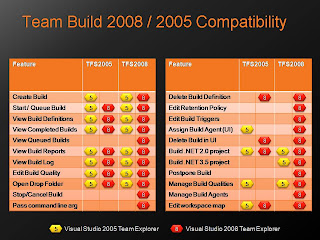
The following chart displays Team Build compatibility between TSF 2005 and TFS 2008 versions.


In addition to that both TeamExplorer can be installed in VSTS 2005, only VSTE 2008 will allow you to access all TeamBuild functionalities within TFS 2008.